
Why Optimized Game Settings Matter for Performance Stability
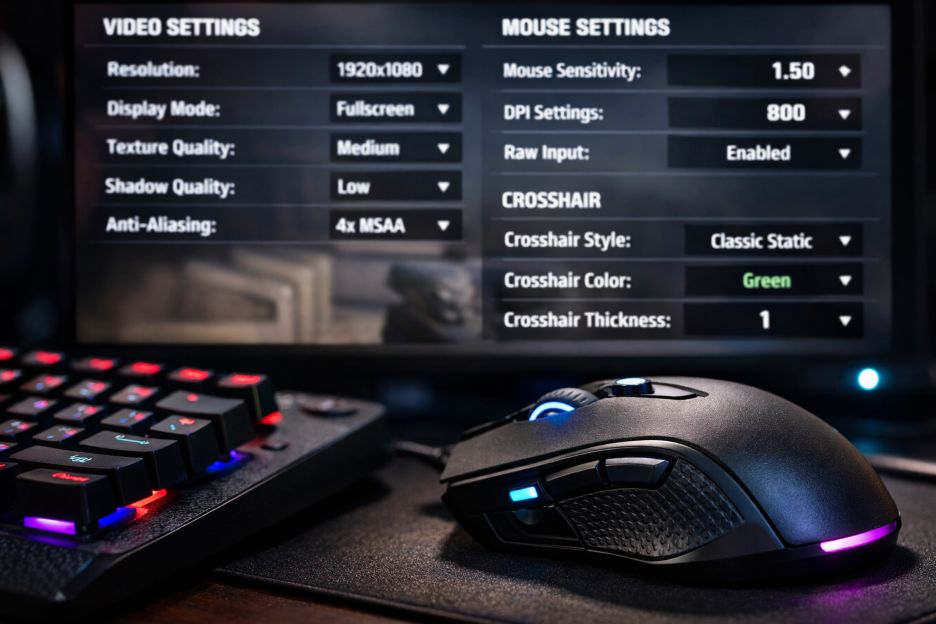
Competitive gaming is no joke. Gamers spent years chasing milliseconds, tweaking every part of their system to eke out an edge. At its core, performance stability often decides whether you clutch a round or watch your screen crumble in defeat. Studies show that consistent frame delivery and low input latency help players maintain focus and react quicker, especially under pressure, as measured in esports performance analytics by Intel’s esports research team.
I’ll never forget a buddy of mine in a CS:GO tournament who kept crashing mid-match because he insisted on ultra settings “for the vibe.” He looked great, sure, but his FPS dropped so hard that his monitor hiccupped like it was possessed. It was chaos. That’s why players and guides like csgo best settings emphasize safety first. These resources highlight ranges for graphics quality, DPI, sensitivity, and more that avoid hiccups and input delay, while also complementing quality control and moderation practices to ensure smooth, reliable gameplay.
The Basics of Game Stability
So what does performance stability actually mean? In simple terms, stability refers to how reliably your game runs over time. It’s not just about hitting high frame rates, it’s about keeping them steady. Sudden dips or spikes in FPS make movement jittery and can throw off timing, especially in shooters and fast-paced titles. Gamers often talk about “smoothness” because our brains pick up stutters faster than we realize. This matters deeply when every split second counts.
Consistency has become more than gamer chatter. Research from Nvidia shows that even slight dips in frame pacing can influence player performance and satisfaction significantly. Whether you’re aiming at heads in battle royale matches or juggling macros in a strategy game, unstable frames and input lag can be maddening. And honestly, it sucks.
Why Consistent FPS and Latency Matter
Imagine you’re lining up the perfect headshot. You flick. Bam. Right place, right time. Only your shot feels sluggish. That’s input latency messing with you. Input latency is the delay between your command (pressing a key, moving your mouse) and the game responding. When systems lag or stutter, that delay grows. Experts at Microsoft’s gaming division have pointed out that reducing input delay improves player responsiveness dramatically. Gamers who fine-tune settings for low latency often feel like their gear reads their mind, almost spooky.
And this isn’t just feel-good talk. Team-based esports rely on teamwork and split-second decisions where a bad frame can derail a whole plan. For instance, pro players often benchmark their setups to ensure every frame is predictable. These players use high refresh rate monitors, low-latency modes, and optimized settings because they want every moment on-screen to reflect exactly what’s happening in their thought process. Unstable performance, then, becomes a chink in the armor. No matter how skilled you are, a shaky system can overshadow your talent.
How Optimized Settings Prevent Performance Issues
What does “optimized settings” even mean? For most players, it’s a balance between visuals and performance. Turning shadows and reflections to ultra might look slick, but they tax your GPU and can introduce frame drops. On the other hand, dialing back unnecessary effects can smooth out gameplay and reduce the odds of sudden slowdowns. Consistent FPS is the goal, not the highest possible numbers.
But it’s more than graphics. Mouse sensitivity and DPI configuration also play a role. If your sensitivity is too high, tiny hand tremors become massive in-game flicks. Too low, and you overcorrect constantly. Many competitive players stick to tried-and-tested sensitivity ranges because these settings have been shown to yield fewer overshoots and better muscle memory development, according to Logitech’s gaming performance field tests. Combining this with stable graphics settings creates harmony between your inputs and what happens on-screen.
Another big piece is your hardware and software harmony. Background apps, outdated drivers, and thermal throttling can sabotage your gaming session. A clean, lean system running only essential processes keeps your GPU and CPU focused on the game. On the software side, updating drivers and tuning settings through your GPU control panel keeps your system from guessing what it should be doing. This can mean the difference between a smooth battle and a lag-filled fiasco.
Real Gamers, Real Gains
One thing that stands out in gaming communities is the shared obsession with finding that sweet spot, that optimal configuration. Reddit threads and Discord servers are full of players debating frame stability vs. visual clarity. And it’s refreshing. Because while aesthetics are cool, performance stability helps you actually enjoy the game and perform at your best.
For casual players, optimized settings mean fewer crashes and better overall experiences. For competitive players, they mean predictability and reliability. You know your inputs, your frames, and your reactions will behave the same way every time. It’s peace of mind wrapped in code and silicon. And frankly, in a world where a few milliseconds can tilt a match, that peace is priceless.
Conclusion
Stability in performance isn’t just a technical buzzword. It’s the backbone of competitive gameplay. Streamlined settings, consistent frame rates, and low input latency give players the confidence to react, control, and excel without their system getting in the way. So whether you’re tweaking your graphics for fluid movement or adjusting your sensitivity for control, remember: reliable performance beats flashy visuals when the stakes are high. Embracing stable system configurations helps you play better and enjoy every match, win or lose.
Performance settings and stable configurations, including controlling frame pacing and latency, help players elevate their gameplay and minimize disruptions at critical moments. Whether you’re targeting better FPS, reducing stutters, or smoothing your inputs, optimized settings are a smart gamer’s best friend.